Free Mermaid Live Editor Alternatives 2026
Tested Mermaid Live Editor alternatives in 2026: where mermaid.live still wins, and which free tools handle AI generation, repair, and watermark-free export.
The Mermaid Live Editor at mermaid.live is the official, open-source playground for Mermaid syntax. It is free, it runs entirely in your browser, and every diagram becomes a shareable link. For authoring a quick diagram and sending it to a teammate, it is still the best tool in the category — this guide will not pretend otherwise.
But "best default" is not "best for everything." The live editor deliberately stops at rendering and sharing. It has no concept of an export preset, no high-resolution raster output, no PDF, and when your code fails to parse, it shows you the error and leaves the repair to you. At some point almost everyone who diagrams in Mermaid hits one of those walls — usually while trying to get a clean image into a README, a slide deck, or a client deliverable.
This guide covers the alternatives worth knowing in 2026, what each one is actually good at, and where each one wastes your time. Everything below was checked by hand on September 20, 2026 — pricing and plan limits in this category change often, so treat any specific number here as a snapshot of that date.
TL;DR
- Stay on mermaid.live for quick authoring and share links. It is the reference implementation and it is free.
- mermaid.ai — the rebranded Mermaid Chart, now the official commercial platform — tightened its free tier to 3 diagrams with watermarked, rate-limited exports. If you are hitting that wall, the feature-by-feature comparison shows where a free-first tool still wins.
- Need publish-ready output — PDF, transparent PNG, 4x scale, docs-ready themes, no watermark — use Mermaid Online (this site), free without signup.
- Need AI to write and repair the code for you, Mermaid Online does both in one loop; most other tools stop at generation.
- mermaideditor.io is the closest feature rival, but its free raster exports carry a watermark and the full feature set sits behind $7/month or a $19 lifetime payment.
- eraser.io is the pick if you want a visual canvas with AI, and do not mind working inside an account-based product.
What "better than the live editor" can mean
Before the list, it helps to separate the four different jobs people mean when they search for an alternative:
- Authoring — writing and editing Mermaid code with a live preview.
- Publishing — turning that code into a finished image file: the right format, scale, background, and look.
- Repair — the code is broken (often AI-generated), and you need it fixed, not just flagged.
- Collaboration — teams, shared libraries, review workflows.
The official live editor owns #1 and does #4 through links. Almost every alternative is really competing on #2 or #3. Judge them on the job you actually have.
1. Mermaid Live Editor (mermaid.live) — the default, and still excellent
Best for: quick authoring, learning syntax, shareable links.
The official editor embeds the current Mermaid release the day it ships, so syntax support is never a question. Diagrams encode into the URL itself, which makes sharing frictionless and keeps the code on the client side. If your workflow ends at "here is a link to the diagram," you do not need an alternative at all.
Where it stops:
- Exports are limited to SVG download and a PNG via its image-service links — no PDF, no transparent-background PNG workflow, no scale presets tuned for docs or slides.
- Theming means writing
themeVariablesJSON by hand. - Errors are reported, not repaired.
2. mermaid.ai — the official commercial tier
Best for: teams already standardized on the Mermaid ecosystem.
Mermaid Chart rebranded to mermaid.ai — it is the commercial arm behind Mermaid itself, and it bundles first-party extras no independent editor can match today: a VS Code extension, Google Docs and Confluence plugins, an MCP server, version history, and multi-user collaboration.
The free tier tightened as the platform grew (verified October 14, 2026): 3 saved diagrams, watermarked exports, rate-limited downloads, and 15 AI credits a month. Paid tiers run $10–20 per user per month. For a team that lives in those integrations, the bundle can be worth the price. For the job this guide is about — "I need a clean image of my diagram" — the free tier stops you at the door.
The side-by-side comparison covers in detail where Mermaid Online deliberately differs: unlimited diagrams, no watermark, no rate limits, rendering that stays in your browser.
3. Mermaid Online — built for the step after authoring
Best for: watermark-free publish-ready exports, AI repair, working without an account.
This is the site you are reading on, so weighted accordingly — but the positioning is specific rather than broad: the editor here treats the exported image as the product, not the link.
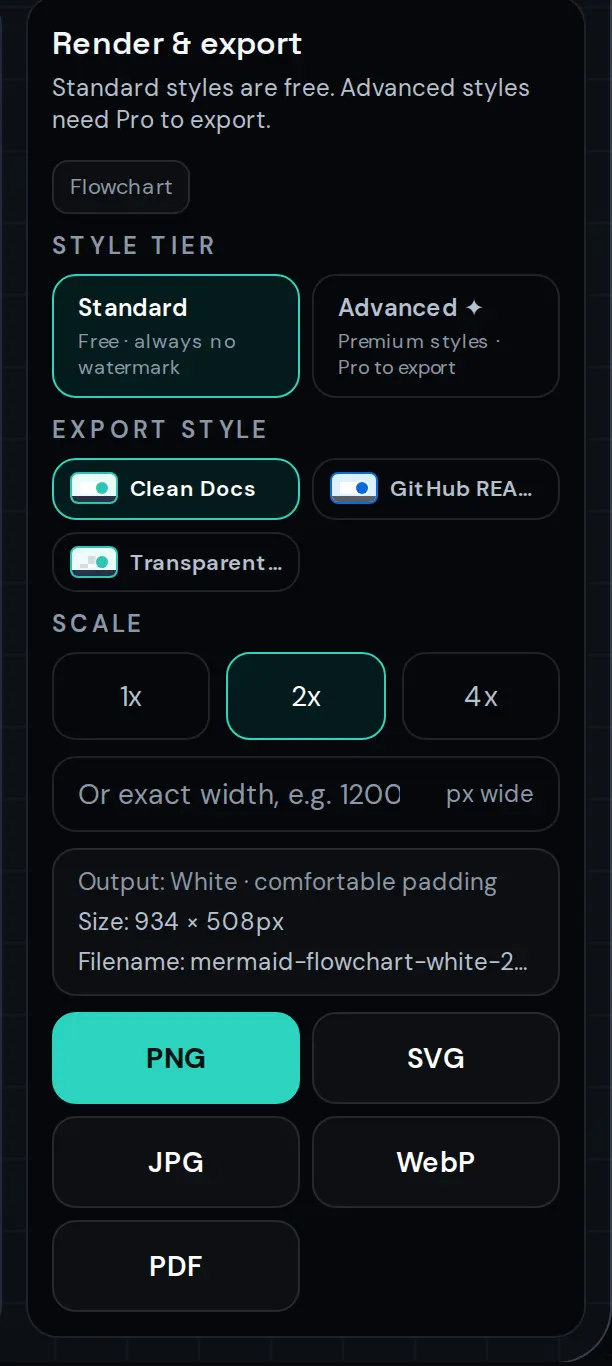
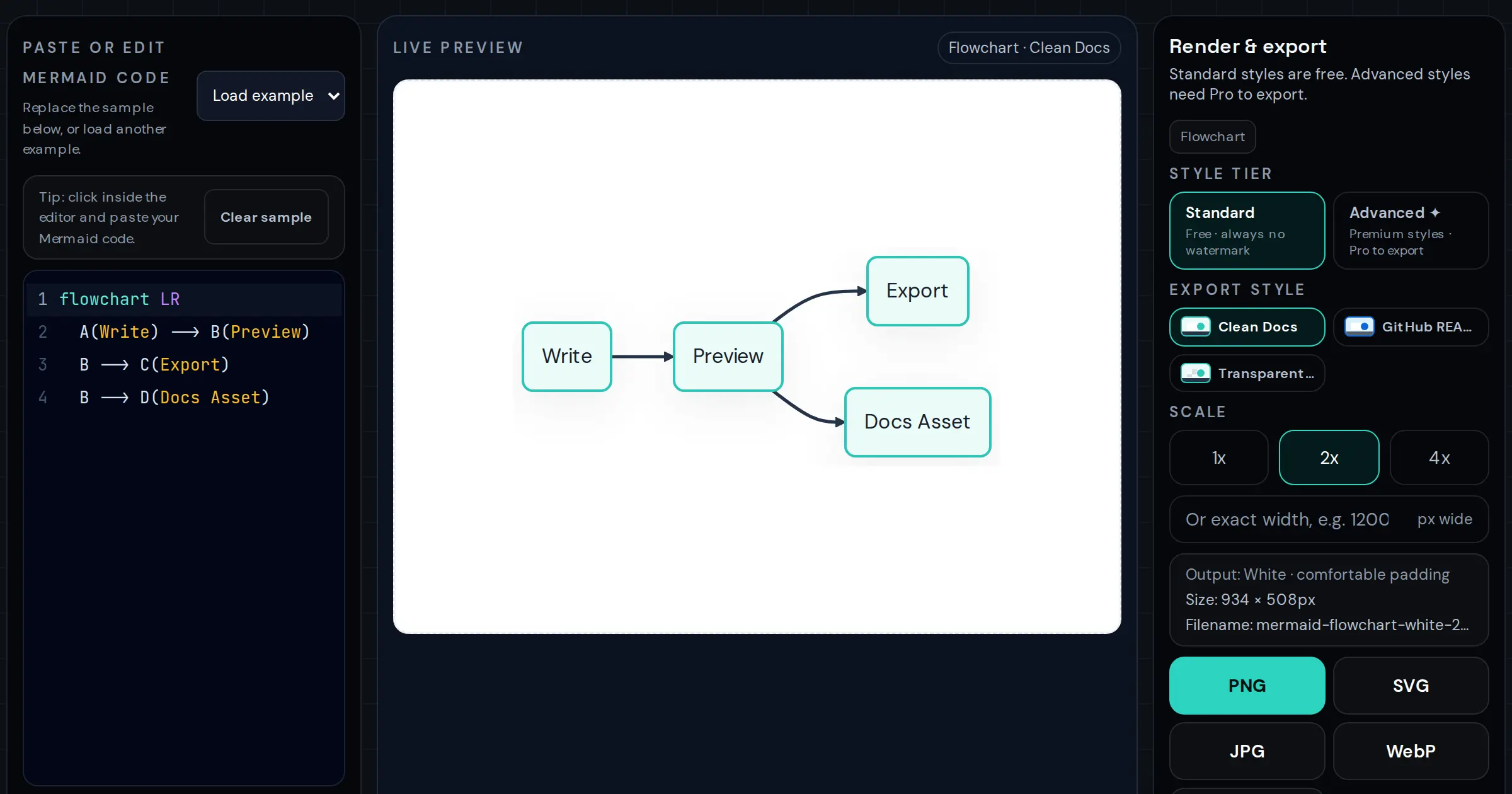
- Free export with no watermark and no signup: PNG, JPG, WebP, SVG, and PDF, at 1x/2x/4x scale, with transparent backgrounds and custom widths. The diagram never leaves your browser.
- AI that also repairs: paste broken — frequently AI-generated — Mermaid and the repair loop returns corrected code; you can also generate a first draft from a plain-language description and refine it with follow-ups (10 free credits after signing in, no card required).
- Hand-tuned themes: nine export styles designed for READMEs, documentation, and slides, because the default Mermaid palette tends to fall apart at presentation distance.
- A syntax checker that points at the offending line when you would rather fix things yourself.
The trade-off, stated honestly: this is a single-player tool. There is no team space, no diagram library, and sharing is by exporting the image rather than by link.
4. mermaideditor.io — the closest feature rival
Best for: an all-in-one editor with cloud sync, if you accept the paywall.
A fast-moving independent editor (Monaco-based, like VS Code) with a large diagram-type catalog and AI generation and repair on the paid tier. Per its own pricing page and homepage (both captured September 20, 2026):
- Free tier: browser-based editing and export, no login required — but raster exports carry a watermark at 1x, and the site's own marketing copy and pricing table disagree about the exact free limits, so verify before relying on the free tier.
- Pro: $7/month or a $19 one-time lifetime payment — up to 8x exports, watermark removal, 200 AI generations and repairs per month, cloud sync for 50 diagrams, and premium themes.
If you want one product to grow into — cloud sync plus AI plus high-resolution export — and you are willing to pay for it, this is the most direct competitor to everything else on this list. The lifetime price is reasonable if you will keep using it.
5. eraser.io — AI diagrams on a visual canvas
Best for: teams that want generated diagrams they can drag apart on a canvas.
Eraser approaches the same problem from the design-tool side: describe an architecture, get a diagram, then move and restyle elements directly. It has a free tier for generating Mermaid diagrams without signup, with editing and saving tied to a free account. It is a full product with paid plans above that tier (check current pricing — it changed more than once in the last year).
Choose Eraser over the other alternatives when the output is a design artifact rather than a documentation image, and when account-based storage is a feature for you rather than a concession.
Side-by-side (snapshot: September 20, 2026)
| Mermaid Live Editor | Mermaid Online | mermaideditor.io | eraser.io | |
|---|---|---|---|---|
| Free tier | Full editor, no account | Full editor + export, no account | Editor; raster exports watermarked | Generation; editing needs account |
| Watermark on free exports | No | No | Yes (raster) | — |
| Export formats | SVG (PNG via image link) | PNG, JPG, WebP, SVG, PDF | PNG, SVG, PDF | PNG, SVG (canvas exports) |
| Max free scale | n/a | 4x | 1x | n/a |
| AI generate | No | Yes (10 free credits) | Yes (paid) | Yes |
| AI repair of broken code | No | Yes | Yes (paid) | No |
| PDF export | No | Yes | Paid | Paid |
| Account required | No | Only for AI credits | Only for Pro | Yes, for editing |
| Shareable links | Yes | Via exported image | Yes (paid cloud) | Yes |
How to choose
- Authoring and sharing only → stay on mermaid.live. Really.
- Diagrams that end up in docs, READMEs, or slides → Mermaid Online: paste code or generate with AI, export the finished image free with no watermark. The Mermaid to PNG guide covers the export settings that matter for print and retina screens.
- You live in AI tools all day → generate and repair in one place with the AI Mermaid generator, and keep the syntax checker open for the cases where you want to see the broken line yourself.
- Canvas-first teams with a budget → eraser.io.
- The official ecosystem — VS Code, Docs plugins, MCP, collaboration → mermaid.ai's paid tiers; its free tier is now too tight for casual export work.
- All-in-one with cloud sync, paywall accepted → mermaideditor.io's lifetime tier.
Frequently Asked Questions
What is the best free alternative to the Mermaid Live Editor?
For most people the official editor at mermaid.live is still the right default — it is free, needs no account, and produces shareable links. You only need an alternative when you hit its limits: publish-ready image export (PDF, high-resolution PNG, transparent backgrounds), AI repair of broken code, or polished themes for docs and slides.
Is there a Mermaid editor without a watermark?
Yes. Mermaid Online (this site) exports PNG, JPG, WebP, SVG, and PDF with no watermark at up to 4x scale with no signup. The official Mermaid Live Editor is also watermark-free. Some third-party editors watermark free exports and charge to remove it — mermaideditor.io stamps free raster exports (verified September 20, 2026), and mermaid.ai watermarks its free tier since the 2026 tightening (verified October 14, 2026).
Can an alternative editor open my mermaid.live share links?
Not directly today. Mermaid.live links carry the diagram code compressed inside the URL fragment, and each tool reads its own format. If you have a mermaid.live link, open it there, copy the code from the editor pane, and paste it into any alternative — the code is plain Mermaid syntax.
Which Mermaid editor can fix broken AI-generated code?
Mermaid Online includes AI generate, repair, and refine: paste broken syntax, and the repair loop returns corrected code (10 free credits after sign-in, no card). The official editor reports the parse error but leaves the fixing to you.
One last practical note: none of these tools lock in your diagrams. Mermaid code is plain text — pick the editor that fits today's job, and switch whenever the job changes.
Try it while you are here
Paste any Mermaid code from this post into the online editor and export it as a crisp PNG, SVG, or PDF — free, no signup, no watermark.